


Eyecon Caller ID & Spam Block
4.45.25K Reviews
App Specs
- Version
- 4.2026.07.15.0638
- Updated On
- License
- Free
- Downloads
- 100,000,000+
- Developer
- Eyecon Phone Dialer & Contacts
- Categories
- Communication
- Platform
- Android
Screenshots

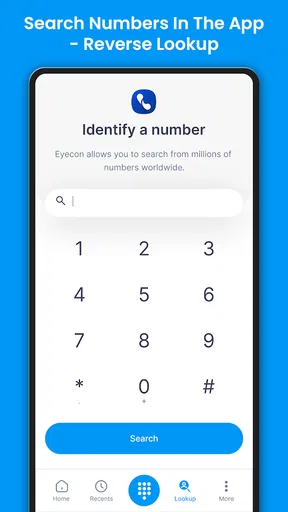
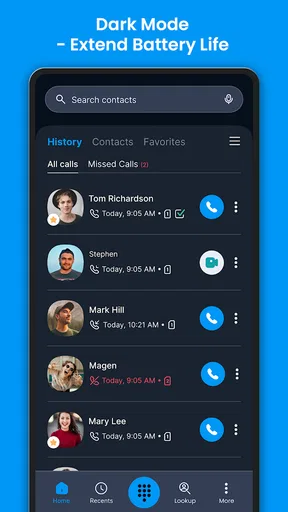
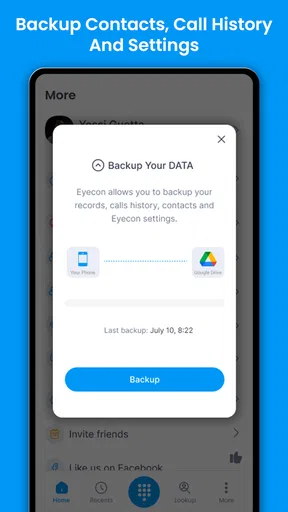
 Analysis by AppCompare
Have you ever looked at your phone, seen a number pop up, and thought, "Who on earth is calling me now?" Well, that's pretty much been my life until I stumbled upon Eyecon Caller ID & Spam Block. This app has been a game-changer in the way I handle calls, and I’m about to tell you why.
Where it fits in a busy phone routine
I find Eyecon most useful when calls are part of the day rather than an occasional interruption. If I’m expecting a delivery, coordinating with a new client, or trying to screen calls while working, a caller ID tool can help me decide whether to pick up without having to search every unfamiliar number. That convenience is the point: it adds context at the moment I need it, rather than asking me to investigate afterward.
A realistic example is a parent waiting for a school or clinic callback while also getting nuisance calls. Eyecon’s identification and blocking tools may make that incoming-call list easier to manage, while the visual contact approach can help distinguish familiar people at a glance. I would still answer cautiously when a call matters: caller information is a clue, not proof of who is on the other end, and a displayed name should not be treated as a security check.
The app is developed by Eyecon Phone Dialer & Contacts and sits in the communication category. It is free to install, rated for Everyone, and supports Android 6.0 and later. The current version is 4.2026.01.29.1510. Its average rating is 4.5 from around 1.2 million ratings, with roughly 5,000 reviews and over 100 million installs. Optional in-app purchases range from $0.49 to $39.99 per item, so I’d check the purchase details before paying for anything; the basic fact that it is free does not mean every extra is free.
Choosing it over a basic dialer
The usual alternative is the dialer and contact list already on a phone. That option is often the better fit if you want a familiar interface, minimal setup, and no extra caller-identification layer. Eyecon makes more sense to me if photos, visual favorites, and added information around incoming calls are worth having in the same calling workflow. The trade-off is that another app can mean more settings to learn and another place to review when something about calls behaves differently than expected.
I would also compare it with a dedicated spam-filtering tool by asking what problem I actually want to solve. If my main concern is simply silencing unknown callers, a phone’s built-in call controls may be enough. If I want help recognizing people as well as handling unwanted calls, Eyecon’s broader approach is more appealing. Neither approach is automatically best: the right choice depends on whether visual contacts and identification add useful context to my everyday calls.
Getting Started with Eyecon
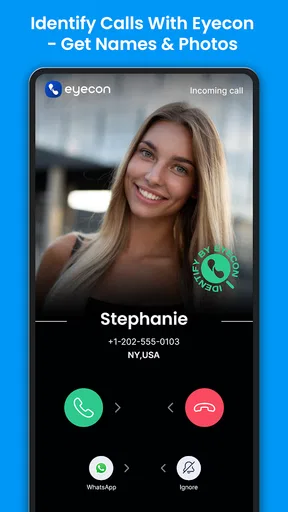
So, downloading and setting up Eyecon Caller ID & Spam Block was a breeze. I just hopped onto the Play Store, hit download, and within minutes, I was up and running. The app doesn't just stop at identifying the caller; it's like having a personal assistant for incoming calls. With its sleek and intuitive interface, it felt like a breath of fresh air compared to the typical caller ID apps.
Worth Reading Before You Choose

Flipboard Shows What News Apps Must Do Beyond the Feed

Switching to Android Auto Means Rethinking Your Driving Routine

Google Calendar Makes a Crowded Week Easier to Manage

Ludo King Makes the Most of the Minutes Between Plans

Baby Panda World Brings Quick Play to Modern Phones, but Its Game Library Feels Busy

ESPN’s Live Game View Makes Following Close Games Easier
Main Features That Stand Out
First off, let’s talk about the caller ID feature. It’s not just about showing a name; Eyecon goes the extra mile by fetching photos from social media profiles. So, if you’re like me and terrible with names but great with faces, this feature is pure gold. Now, when Sarah from college calls, I can see her latest Facebook pic and immediately remember who she is!
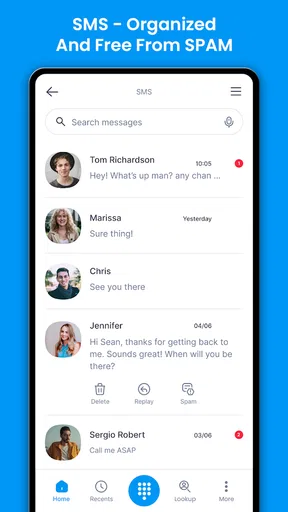
Another nifty feature is the spam block. We all know how annoying telemarketers can be, right? Eyecon automatically blocks those pesky spam calls, making my life a lot easier. It even has a community-based list of numbers, so it keeps getting better as more people use it.
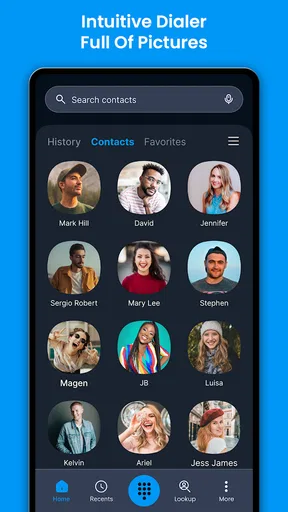
And let’s not forget the visual dialer. It’s like having a contact list on steroids. With big, easy-to-tap photos, I can call my favorites without squinting at tiny text. Plus, the app is super customizable, so you can tweak it to your heart's content.
Making identification useful without overrelying on it
Caller identification is most valuable when I treat it as a prompt to make a decision, not as a guarantee. A name or image can help me recognize a likely contact, but details can be incomplete or outdated. If a caller asks for a password, payment, or personal information, I would end the call and contact the organization through a channel I already trust. That habit matters even when a number appears familiar.
There is also a practical way to keep a visual dialer from becoming cluttered: use favorites for the people I call often, rather than trying to make every contact prominent. That makes the large-photo layout useful for quick calls and leaves less-used names in the regular contact list. It is a small workflow choice, but it helps the visual design serve a purpose instead of becoming decoration.
For spam blocking, I’d review how the app handles calls after setting it up rather than assuming every unwanted call will disappear. Community-based identification can be helpful, but it depends on the number being recognized and on the call matching that information. When I’m waiting for an unfamiliar but important call, I would be cautious about relying on aggressive blocking alone; checking the call history and adjusting the way I screen calls is safer than missing something I need.
Everyday Use and Performance
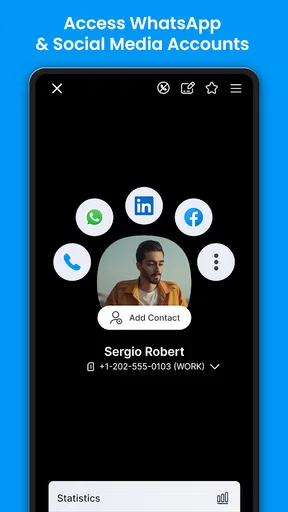
Using Eyecon daily has been a smooth ride. The app runs quietly in the background, doing its thing without hogging battery life. I’ve noticed a significant drop in spam calls, and the satisfaction of identifying callers in seconds is just unbeatable. Also, the integration with messaging apps like WhatsApp is a sweet bonus. It’s like having all my communication tools in one spot.
One thing I appreciated was the privacy controls. In a world where data privacy is a massive concern, Eyecon gives you control over what’s shared and what’s not. It’s reassuring to know they’re not snooping around my personal info.
Privacy choices and setup trade-offs
When I install a caller ID app, I take a moment to consider which parts of the experience I actually want. A visual dialer and caller information can be useful, but I would not enable or share information casually just to get through setup faster. I’d read each permission or privacy choice as it appears, decide whether it is necessary for the feature I want, and revisit the controls if my preferences change. That is a more sensible approach than assuming that a privacy setting covers every possible concern.
Social-profile photos are a particularly useful example of the trade-off. They can make a familiar caller easier to recognize, but some people may prefer a plain name-and-number display and less visual information. If that describes you, the photo-centered presentation may feel unnecessary even if the rest of the call tools are appealing. I would try the app with the features I want in mind and keep only the parts that make my own routine clearer.
Another question worth considering is whether Eyecon needs to be the main dialer experience on your phone. If you already have a calling setup you like, changing it may not be worthwhile just to gain a different contact screen. I’d compare the actual day-to-day steps—finding a person, placing a call, checking an unfamiliar number—with the routine I already use. If Eyecon makes those steps easier, the switch has a concrete benefit; if not, there is little reason to add complexity.
Who will get the most from it
I’d recommend Eyecon to people who regularly receive calls from numbers they don’t immediately recognize and who like identifying contacts visually. It can also suit someone who makes frequent calls to a small group and would appreciate large photo shortcuts. The combination of caller context, spam tools, and a visual dialer gives it a more personal feel than a plain number list, especially for users who prefer seeing faces to scanning names.
I’d be less likely to recommend it to someone who rarely takes calls, already finds their phone’s built-in caller controls sufficient, or wants the simplest possible dialer. It may also be a poor match for anyone uncomfortable with adding a third-party layer to calling or with making privacy choices around contact and caller information. In those cases, sticking with the default phone app is a perfectly reasonable decision, not a missed opportunity.
Why You Should Try It
In a nutshell, Eyecon Caller ID & Spam Block is more than just a caller ID app. It’s a comprehensive tool that enhances how you manage calls. With its user-friendly interface and powerful features, it’s a must-try for anyone tired of unknown numbers and spam calls.
If you’re on the fence about trying yet another app, give Eyecon a shot. It’s not just about blocking spam; it’s about making your call experience smarter and more personal. Whether you’re tech-savvy or a casual user, this app has something for everyone. Trust me, once you try it, you’ll wonder how you ever lived without it!
What I’d keep an eye on
The app’s current version gives existing users a clear point of reference when checking whether they are running the latest release. The available release information establishes the current version, but it does not give me a reliable feature-by-feature history to claim exactly what changed over time. I would therefore separate what I can judge now—the caller ID, blocking, visual dialer, and privacy controls—from any expectation that a particular update has added a specific capability.
For someone already using Eyecon, the practical question is whether the current calling workflow remains helpful: Are the caller details useful? Are important calls still easy to catch? Does the visual dialer make frequent contacts quicker to reach? Those are better measures of value than updating simply because a version number has moved. For a new user, I’d look for a comfortable balance between the convenience of caller context and the amount of setup and privacy decisions involved.
My overall view is that Eyecon is strongest when its distinctive visual approach solves a real problem: recognizing callers quickly and making familiar contacts easier to reach. It is not a replacement for careful judgment, and it may be more app than a minimalist caller needs. But if unknown calls regularly interrupt your day and you like a photo-led way to manage contacts, I think it is worth trying—then keeping only the features that genuinely make your calls easier to handle.
Pros
- Intuitive and user-friendly interface.
- Accurate caller ID recognition.
- Efficient spam call blocking.
- Customizable contact photos.
- Integrates well with social media.
Cons
- Occasional lag in call identification.
- Ads can be intrusive at times.
- Limited free features.
- In-app purchases can be pricey.
- Requires access to personal data.
FAQs for Eyecon Caller ID & Spam Block
What is Eyecon Caller ID & Spam Block, and how does it work?
Eyecon Caller ID & Spam Block is an app designed to enhance your calling experience by identifying unknown callers and blocking spam calls. It works by accessing a vast database to match caller information and providing a visual caller ID. This helps users avoid unwanted calls and easily identify contacts.
Is Eyecon Caller ID & Spam Block free to use?
Eyecon offers a free version with essential features like caller identification and spam blocking. However, for advanced features such as ad-free usage and additional customization, users can opt for a premium subscription. This flexibility allows users to choose based on their needs and budget.
How does Eyecon protect my privacy and personal information?
Eyecon takes privacy seriously by using secure connections and encryption to protect user data. The app only accesses necessary information to provide its services and does not share your personal data without consent. Users can also customize privacy settings to control what information is shared.
Can Eyecon integrate with my phone's existing contacts and dialer?
Yes, Eyecon seamlessly integrates with your phone’s contacts and dialer. It enhances your contacts with photos and social media links, providing a more personalized calling experience. This integration allows for a smoother transition and enriches your interaction with contacts.
Does Eyecon work internationally, and how effective is it in different regions?
Eyecon is designed to work globally, providing caller ID and spam blocking in various regions. Its effectiveness may vary depending on the region due to differences in local databases and spam call frequency. Regular updates help maintain its accuracy and effectiveness across different locations.


